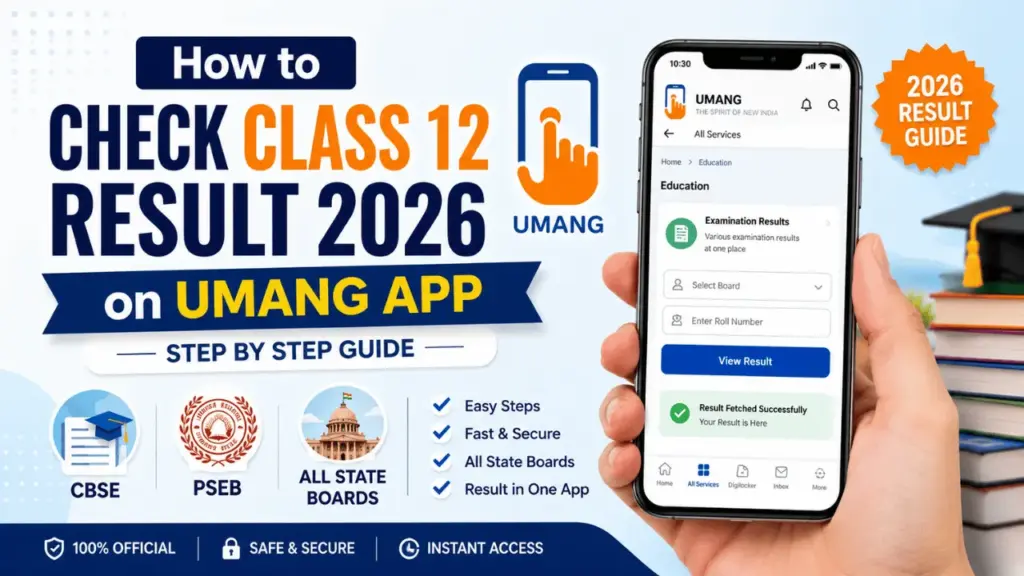
Every year, millions of students visit the same government website on the result day. But students face a lot of issues while checking the result, the page takes a lot of time to load. UMANG app is the solution to this and many students do not even know about it.
UMANG is an official Indian government platform developed by the Ministry of Electronics and Information Technology and it stands for Unified Mobile Application for New-age Governance. This app helps you access a huge number of government services including board exam results for CBSE, PSEB and many other state boards in one place.
This article will help you know all about UMANG app, how can you check Class 12 result on it, which boards are available and what to do once you check the results.
Quick Overview — UMANG App for Class 12 Result 2026
| Details | Info |
|---|---|
| App Name | UMANG — Unified Mobile Application for New-age Governance |
| Developed By | Ministry of Electronics and IT, Government of India |
| Available On | Android — Play Store, iOS — App Store |
| Official Website | web.umang.gov.in |
| Boards Supported | CBSE, PSEB, and multiple state boards |
| Login Required | Mobile Number + OTP |
| Result Type | Provisional scorecard |
| Cost | Free |
What is UMANG App and Why Use It for Class 12 Result
UMANG is an official government app, not a third-party app. It has been made and managed by the Government of India, it is a platform which allows you to access central and state government services on mobile very easily. On the app, students can access the board results, DigiLocker documents and scholarship portals so they do not have to switch to different websites and portals.
The best part about UMANG app is that you can access the results without any issue when millions of students are accessing the websites like cbseresults.nic.in or pseb.ac.in at the same time and causing server overload error. UMANG takes care of the traffic through a completely different infrastructure. It is more relaible than the official websites during the peak hours.
The UMANG app also declared that on 12 May 2026, CBSE Class 12 Result 2026 will be available on its platform shortly. This confirms that the app is updated timely for result days and is a good choice for the information you need.
How to Download UMANG App
For Android: You can open Google Play Store → Search “UMANG” → Then install the official app by National eGovernance Division → Now open after installation.
For iOS: Open Apple App Store → Then search “UMANG” → Now install the official government app → You can open it after installation.
For Desktop: You can also visit web.umang.gov.in on any browser and download is not needed.
You do not need to pay anything or buy a subscription in order to use UMANG app, it is free of cost.
How to Check CBSE Class 12 Result 2026 on UMANG App
CBSE Class 12 result 2026 can be out anytime within 1 or 2 days. Once the result is announced, here is how you can check it:
Step 1: You need to open the UMANG app on your mobile phone.
Step 2: After that sign in with your registered mobile number. If you are a new user, you can complete the registration quickly using OTP verification, it will take less than two minutes.
Step 3: Once you are on the homepage, use the search bar at the top and type “CBSE”.
Step 4: Now select the CBSE services section from the search results.
Step 5: You need to click on “CBSE Class 12 Result 2026” once the link is activated.
Step 6: Then enter your roll number, school number and admit card ID in the given field.
Step 7: You need to check twice all the information that you have entered.
Step 8: Now click Submit.
Step 9: After that your CBSE Class 12 scorecard will appear on screen with subject-wise marks, grades, and passed or failed status.
Step 10: At the end, download the PDF or take a screenshot immediately, you can save it on Google Drive and email it to yourself.
How to Check PSEB 12th Result 2026 on UMANG App
PSEB 12th Result 2026 was declared today on May 13, 2026. Students who are facing issues on the website pseb.ac.in, they can use UMANG app as a reliable option to check the results:
Step 1: You can open UMANG app.
Step 2: Now log in with your mobile number.
Step 3: Then search for “PSEB” in the search bar.
Step 4: You can select Punjab School Education Board from the results.
Step 5: After that, click on Class 12 Result 2026 option.
Step 6: Enter your roll number exactly as printed on your admit card.
Step 7: Then click Submit.
Step 8: Your Punjab Board Higher Secondary result will be available on the screen, you need to download it immediately.
How to Check State Board Class 12 Result 2026 on UMANG App
UMANG supports a number of state board results. The process for all boards are almost similar:
Step 1: You need to open UMANG app and log in.
Step 2: Then use the search bar and type your board name, for example “WBBSE” for West Bengal or “TBSE” for Tripura or “DHSE” for Kerala.
Step 3: Now select your board from the results.
Step 4: You can now choose the Class 12 or Higher Secondary result option.
Step 5: Now enter required credentials like usually roll number and date of birth.
Step 6: Submit and download your result immediately.
Please note that not all boards are available on UMANG app. You can check the result if your board is listed but if the board is not listed then use the official board website or DigiLocker as another option.
UMANG App vs Official Board Website — Which is Better on Result Day
| Feature | UMANG App | Official Board Website |
|---|---|---|
| Traffic Handling | Better — separate infrastructure | Poor — crashes frequently |
| Speed on Result Day | Faster | Very slow |
| Available on Mobile | Yes — dedicated app | Browser only |
| Multiple Boards | Yes — one app for all | No — separate sites |
| DigiLocker Integration | Yes | No |
| Free to Use | Yes | Yes |
| Internet Required | Yes | Yes |
| Offline Access | No | No |
For better experience, students should give it a try to UMANG app. You may experience delay due to peak hours during result season.
UMANG App Class 12 Result 2026 — What Details Will You See
The scorecard on UMANG has the same information as the official board website. You just need to be carefully checking all of the below information:
Your full name and spelling, roll number, school number, registration number, subject wise marks in each paper, total marks, overall percentage, grade in each subject, division secured and qualifying pass or fail status.
Any error in name spelling, date of birth or marks should be highlighted to school authorities on the same day so it can be fixed as early as possible. Board corrections may take a lot of time which can impact your college admissions by having it delayed.
UMANG App Result is Provisional — What That Means
The result on UMANG app is a provisional scorecard which is the same as what shows on the official board website. It is helpful for many things including college admissions and scholarship applications. But remember that the original physical mark sheet and passing certificate will only be issued by your school after a few days from the result declaration date. You can collect the original document from school as soon as it is available.
If you want a permanent digital copy then use DigiLocker. It provides you the legal mark sheet which is valid and accepted by universities, government offices and passport authorities.
Other Ways to Check Class 12 Result 2026 Besides UMANG
DigiLocker
DigiLocker is very helpful as it allows you to access an officially verified digital marksheet. You need to visit digilocker.gov.in or the DigiLocker app after that sign in with mobile number which is linked to your Adhaar Card and search for your board. You will be able to access the marksheet within a few hours once the result is announced.
SMS Method
For CBSE — Type CBSE12 then type your roll number, school Number and centre number. After that send it to 7738299899.
For PSEB — Type PB12 then your roll number. Send it to 5676750.
For other boards, you need to check the official board website for the SMS number and the format in which the SMS needs to be sent.
IVRS — Interactive Voice Response System
CBSE provides an IVR help so that the students can call and hear their result details on the phone. You just need to dial 011-24300699 from any state in India and follow the voice instructions.
Official Board Websites
| Board | Official Result Website |
|---|---|
| CBSE | cbseresults.nic.in |
| PSEB | pseb.ac.in |
| WBBSE | wbresults.nic.in |
| DHSE Kerala | results.hse.kerala.gov.in |
| TBSE Tripura | tbresults.tripura.gov.in |
| PSEB Punjab | pseb.ac.in |
| DGE Tamil Nadu | tnresults.nic.in |
What to Do After Checking Class 12 Result on UMANG
You should save the result in all these three places: phone gallery, email, and google drive. Also check every little detail on the score card, if you find any error, let the school know as soon as possible.
College application process starts immediately once the result is out. For CUET applications, state university admissions and private college admissions deadlines run at the same time so you sould not delay.
You can check your board’s official website for compartment exam details if you have failed the examination. Generally supplementary exams are conducted in July to August 2026. Application forms and fees will be informed after the result day.
Frequently Asked Questions — UMANG App Class 12 Result 2026
-
What is UMANG app?
UMANG is an official Indian government app — Unified Mobile Application for New-age Governance — developed by the Ministry of Electronics and IT. It provides access to government services including board exam results.
-
Is UMANG app free?
Yes. UMANG is completely free to download and use on both Android and iOS.
-
Which Class 12 boards are available on UMANG?
CBSE is confirmed on UMANG. PSEB and several state boards are also accessible. Search your board name inside the app to check availability.
-
Is UMANG result the same as official board website result?
Yes. UMANG fetches result data from official board systems. The result is identical to what appears on the official board website.
-
Is UMANG marksheet valid for college admission?
The UMANG scorecard is provisional and accepted for most admissions. Original marksheet from school is needed for final document verification.
-
What if my board is not on UMANG?
Use your official board website, DigiLocker or the SMS method provided by your board.
-
Why is UMANG faster than official websites on result day?
UMANG runs on a separate government infrastructure optimized for high traffic. Official board websites often crash because of simultaneous access by millions of students.
-
Can I check Class 12 result on UMANG website without downloading the app?
Yes. Visit web.umang.gov.in on any browser — no app download needed.
Important Links
- UMANG App: web.umang.gov.in
- Play Store: Search “UMANG” on Google Play
- App Store: Search “UMANG” on Apple App Store
- DigiLocker: digilocker.gov.in
- CBSE Result: cbseresults.nic.in
- PSEB Result: pseb.ac.in